
# Restake your LSTs

## 1. Enter [Eigenpie](https://www.eigenlayer.magpiexyz.io/restake)

## 2. Connect your Wallet

* Hover to the top right corner of your page and connect your wallet

<figure><img src="https://195834907-files.gitbook.io/~/files/v0/b/gitbook-x-prod.appspot.com/o/spaces%2FHbLaOgcDyxDsNWuNgBMC%2Fuploads%2FqSDQGxSQvJFPEWlPNIbx%2FScreenshot%202024-04-04%20at%204.46.33%20PM.png?alt=media&#x26;token=7d863386-99ca-4398-a2f9-5724f63e81d1" alt=""><figcaption></figcaption></figure>

## 3. Navigate to the "Restake" tab

<figure><img src="https://195834907-files.gitbook.io/~/files/v0/b/gitbook-x-prod.appspot.com/o/spaces%2FHbLaOgcDyxDsNWuNgBMC%2Fuploads%2F1kuf3bHbTl2XVIJED5YX%2Fimage.png?alt=media&#x26;token=c8ba0d61-02bb-4015-befb-f8e096fadf97" alt=""><figcaption></figcaption></figure>

## 4. Select a pool to restake your ETH LSTs

<figure><img src="https://195834907-files.gitbook.io/~/files/v0/b/gitbook-x-prod.appspot.com/o/spaces%2FHbLaOgcDyxDsNWuNgBMC%2Fuploads%2FWSDrMA5KUgKhtK9OJYFL%2FScreenshot%202024-04-04%20at%202.32.42%20PM.png?alt=media&#x26;token=12804308-7007-4a2b-8112-15ab93976b8b" alt=""><figcaption></figcaption></figure>

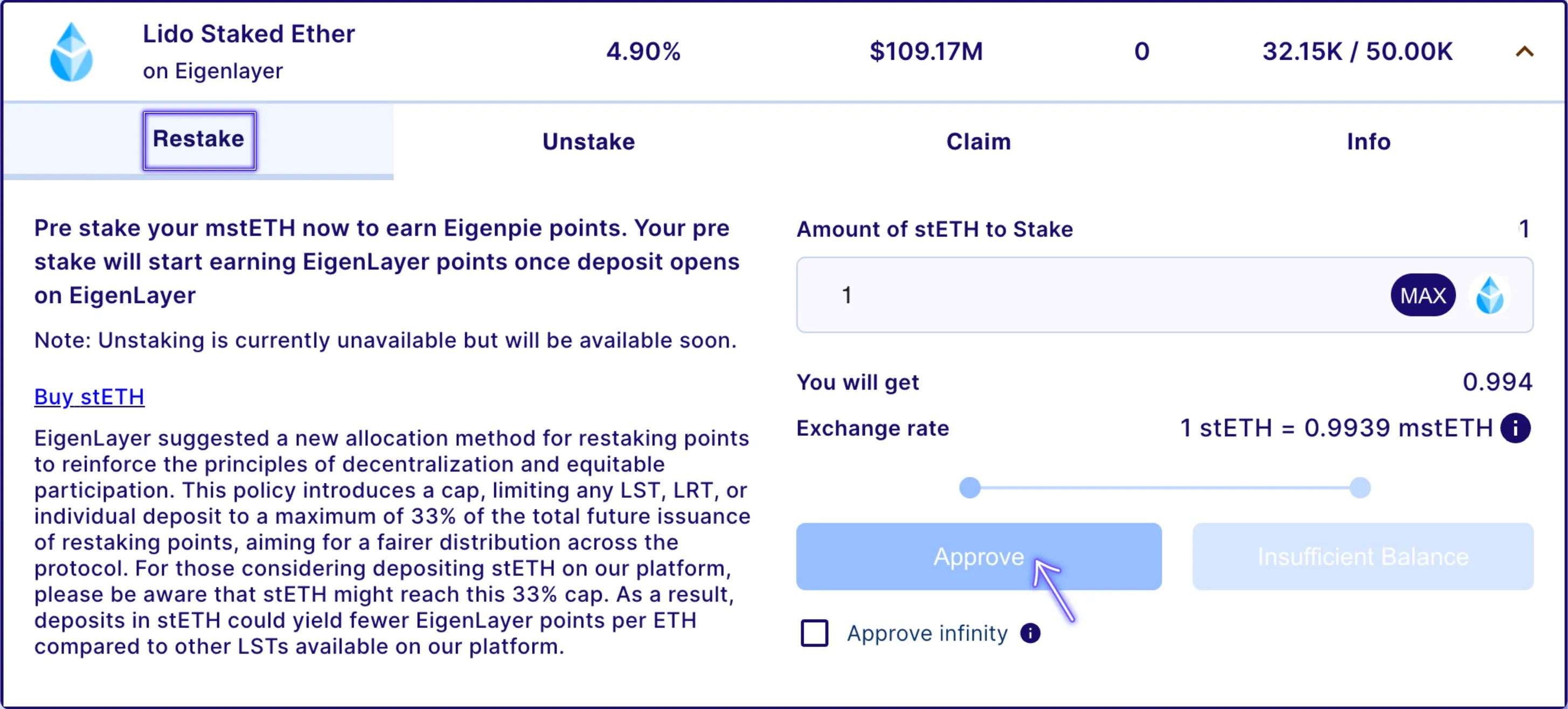
## 5. Approve the Pre-Deposit of your LSTs into Eigenpie

* Select the amount of tokens to pre-deposit
* Approve (Approve infinity can be selected in case that users want to pre-deposit more tokens later)
<figure><img src="https://195834907-files.gitbook.io/~/files/v0/b/gitbook-x-prod.appspot.com/o/spaces%2FHbLaOgcDyxDsNWuNgBMC%2Fuploads%2FrQsNcjXjAKxchKqZNLex%2FScreenshot%202024-04-04%20at%203.24.37%20PM.png?alt=media&#x26;token=ff636798-730b-4564-861e-ae280b3748df" alt=""><figcaption></figcaption></figure>

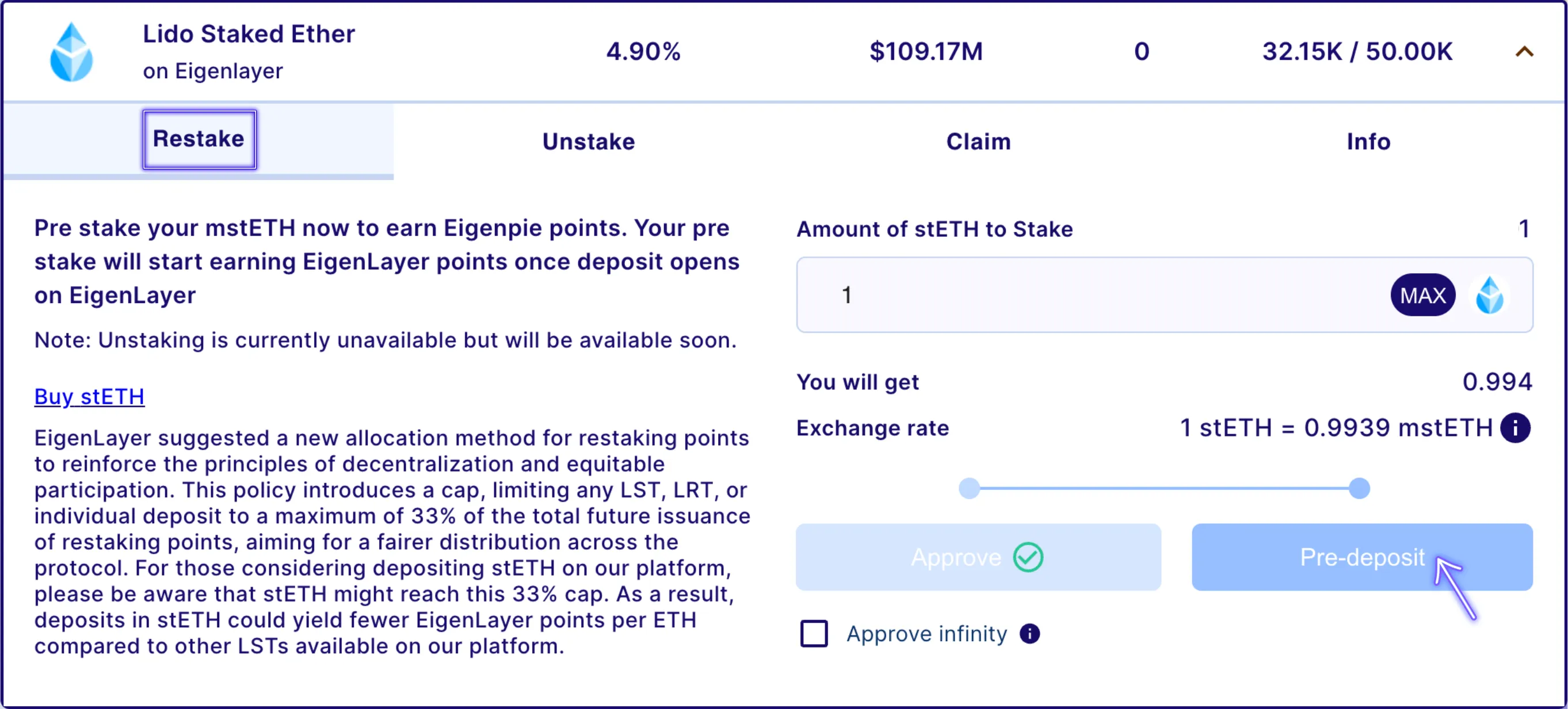
## 6. Pre-Deposit your LSTs

* Pre-Deposit your LSTs into Eigenpie and automatically start accumulating Eigenpie Points
* LST depositors on Eigenpie accumulate 1 Eigenpie Point every hour
<figure><img src="https://195834907-files.gitbook.io/~/files/v0/b/gitbook-x-prod.appspot.com/o/spaces%2FHbLaOgcDyxDsNWuNgBMC%2Fuploads%2FriA33n93CiO4XCPsIRyb%2FScreenshot%202024-04-04%20at%203.22.59%20PM.png?alt=media&#x26;token=d7917f9c-d0fc-4138-b6d6-7b56b6f36f59" alt=""><figcaption></figcaption></figure>

